Sunday, September 24, 2006

Megaupload download slot bypass hack

UPDATE:
This hack works only in the Firefox browser!! If you don't have the Firefox browser then click on the Firefox button on the right side (-->) of page to download Firefox browser for free!!
By the way Firefox is great browser and has so many add on features which is not there in any other browser !! So use the Firefox button there on the right side of page (-->) and download it for free !!!


NOTE: The following hack doesn't seem to work in some countries.
So, a new megaupload hack is given here. So use that if this don't work.

Megaupload
is a popular file hosting service. It allows files upto 250MB to be uploaded by anyone and then downloaded for free by anyone.

But it has some limitations... Yes, the number of download slots is limited for some countries.
If all the slots for a country are occupied then no one from that country can download any file.
The following error message is displayed:

"All download slots assigned to your country are in use. Please try again later."

You will have to wait till any of the slots become free to start downloading.

Hacks to bypass megaupload download slot limitations:

  • Install "User Agent Switcher" extension in your firefox browser using the following location.
http://chrispederick.com/work/useragentswitcher/
  • Then add a new user agent as given below.
Mozilla/4.0 (compatible; MSIE 6.0; Windows NT 5.1; SV1; Alexa Toolbar)

  • Now change your user agent to the above mentioned one.
  • Now open the megaupload link and download without any trouble.

NOTE: The above hack doesn't seem to work in some countries. new megaupload hack is here. So use this, if the above don't work.

Wednesday, September 20, 2006

Great Google Adsense Alternatives

Are you not able to signup to google Adsense for some reasons ????

Did google kick you out of Adsense program ???

Then this list is for you. Here is a list of programs from where you can earn money.

It is a great alternative for google adsense.

Adbrite
AdEngage
Adgenta
Adhearus
AffiliateSensor
AllFeeds
BannerBoxes
BidClix
Bidvertiser
CBProSense
Chitika
ClicksAdsDirect
Clicksor
ContextWeb
Enhance Interactive
ExpoActive
Fastclick
InfoGrabber
Intellitxt
Kanoodle
Nixxie
Quigo
RevenuePilot
SearchFeed
TargetPoint
Veoda

My Pick is Bidvertiser !! It has an very easy registration process. We can start earning instantaneously !!!

Sunday, September 17, 2006

What to do if my gmail gets full ?

Update: Your Gmail is not yet full? I have a post which will help you to avoid getting gmail full.

Gmail gives a lot of storage space...but sometimes, even that 2+ GB is not sufficent for us !!!If you can follow my instructions then you can get all your email, even if its full !!

* Delete at least few emails with unnecessary big attachment. Even if you dont want to delete it then forward to any of your alternate mail boxes. Make sure that its 99% full but not 100%. It wont be a problem for you to receive any mail, here after.
(Usually you can delete the MP3 files stored in your Gmail !! Obviously you must be having those somewhere else in your ipod or your hard disk!! )

* Signup for another Gmail account. (Note: This is where all of your emails are going to come here after after some tweaks)

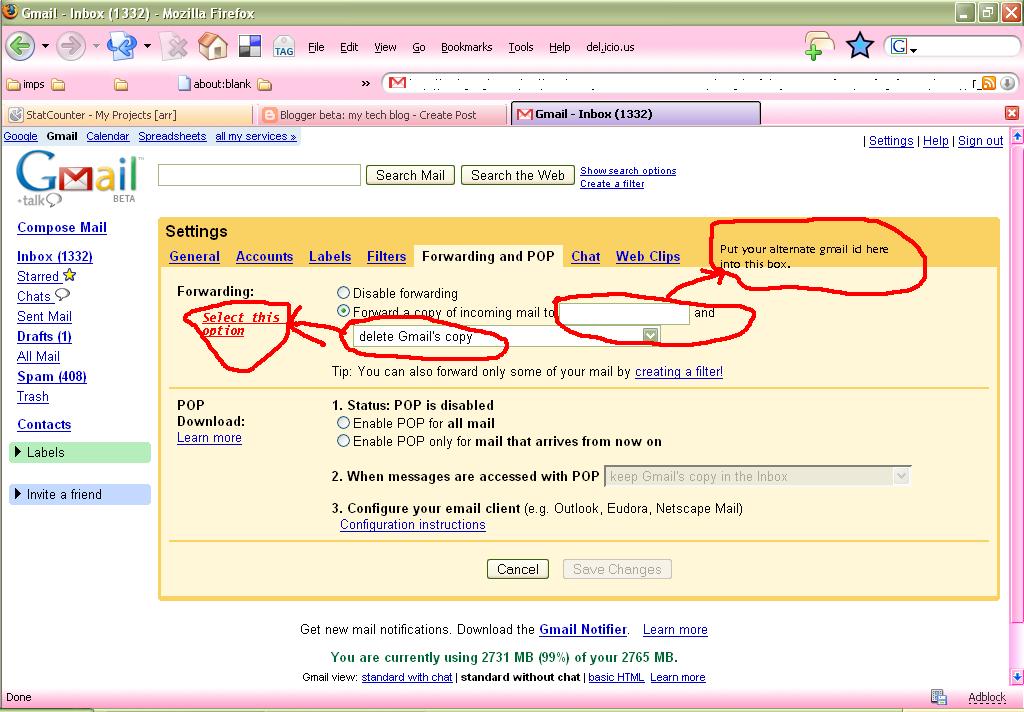
* Now, go to your inbox where its almost full. Then go to settings. There click on the tab link "Forwarding and POP"

* Fill it as shown below.


i.e., Forward a copy of incoming mail to [your new gmail id]
and select the option "delete Gmail copy"

* Thats it!! All your incoming emails would be forwarded to your new gmail box now.
your almost full old inbox will remain as it is !!!

[[[ I know that some of you must have already figured this out... But wait... advanced hacks are coming here in my next part !!! ]]]

Feel free to share your thoughts on this...

Wednesday, September 13, 2006

BSNL dataone broadband save bandwidth - part 2

Please read Dataone Hacks - part 1 before proceeding !!

Now, more tips to save your BSNL Dataone broadband connection bandwidth.

Tips 2:

Use Firefox + Adblock + Flashblock for net browsing.

Yes... Firefox is a wonderful browser and it has useful extensions too...

So download firefox first to save your bandwidth.

After installing firefox, now install an extension called adblock.

Then install another extension called flashblock.

Both of these stop unwanted flash adds from showing in your browser and thus save your download time and save bandwidth for you !!!

Tuesday, September 12, 2006

BSNL dataone broadband save bandwidth - part 1

Yes.. you get a bandwidth of 256 kbps and monthly data usage limit of 1 GB, for BSNL dataone connection. You got to save your bandwidth, if you want to get 100% from it.
I am going to give you various tips to do that.

Tip # 1:

Disable automatic update to most of your windows programs.

You can increase your online security to some extend by turning on the automatic updates !!!!

But what you ask is for more bandwidth, then turn them off !!!!!

You can safely turn it off for the following programs:

** Your windows Operating system

( he he you can turn it on only if you have a genuine version on your system !!!)

** Firefox browser
( it sliently downloads a file of about 9 to 10 MB in background without your consent as a serious security update :D !!!)

** Adobe products (like acrobat reader)

** Any other product you know...

BUT I recommend to turn it **on** for your Anti virus program !!!

I guess by doing this you can save your BSNL Dataone broadband bandwidth to some fairly good extend.

I will post many other comments, tomorrow. Catch you then.

UPDATE: BSNL DATAONE Hacks Part 2 link

Welcome to my blog

Welcome to my blog. Here you can find many useful stuff.
This is going to be pure Tech blog.

I have planned to speak about various things like
* My broadband BSNL Dataone connection
* Useful Internet tips and tricks
* Coding Contests for developers
* and so on....

I am going to tell my new findings on internet also !!

So keep visiting my blog.
Dont forget to bookmark my blog !!!