I love Gmail. But it has some limitations like limited storage space, no sorting by sender name/size, etc...
Yahoo, Rediff and many others are giving unlimited storage for the mail box. So one thing you can do is you can forward all your mails to your mailbox at yahoo or rediff or what ever. So when your gmail box gets full you can delete very old mails/news letters/big attachments without worrying, since you know that you have a backup at another mailbox. This way you can continue using your Gmail.
Also you now have the option to search for mails 'with attachments' in gmail. You can forward those mails with big attachments to any other mail box by setting simple rules in your settings.
Many of us might be using Gmail drive - A virtual file system built based on gmail's free pop access.
I recommend, using a seperate gmail account for your gmail drive, coz if you use your primary account you account space will be eaten very quickly.
You can utilize the free pop access which gmail gives. That will give you the comfort of Thunderbird or M$ Outlook!!
Dont forget to give me your inputs!
Showing posts with label gmail full. Show all posts
Showing posts with label gmail full. Show all posts
Thursday, August 09, 2007

Sunday, September 17, 2006
What to do if my gmail gets full ?
Update: Your Gmail is not yet full? I have a post which will help you to avoid getting gmail full.
Gmail gives a lot of storage space...but sometimes, even that 2+ GB is not sufficent for us !!!If you can follow my instructions then you can get all your email, even if its full !!
* Delete at least few emails with unnecessary big attachment. Even if you dont want to delete it then forward to any of your alternate mail boxes. Make sure that its 99% full but not 100%. It wont be a problem for you to receive any mail, here after.
(Usually you can delete the MP3 files stored in your Gmail !! Obviously you must be having those somewhere else in your ipod or your hard disk!! )
* Signup for another Gmail account. (Note: This is where all of your emails are going to come here after after some tweaks)
* Now, go to your inbox where its almost full. Then go to settings. There click on the tab link "Forwarding and POP"
* Fill it as shown below.
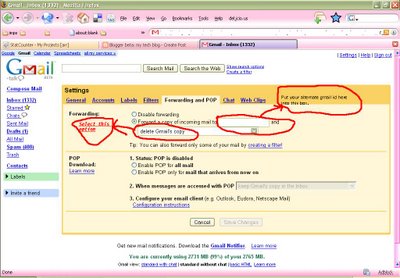
i.e., Forward a copy of incoming mail to [your new gmail id]
and select the option "delete Gmail copy"
* Thats it!! All your incoming emails would be forwarded to your new gmail box now.
your almost full old inbox will remain as it is !!!
[[[ I know that some of you must have already figured this out... But wait... advanced hacks are coming here in my next part !!! ]]]
Feel free to share your thoughts on this...
Gmail gives a lot of storage space...but sometimes, even that 2+ GB is not sufficent for us !!!If you can follow my instructions then you can get all your email, even if its full !!
* Delete at least few emails with unnecessary big attachment. Even if you dont want to delete it then forward to any of your alternate mail boxes. Make sure that its 99% full but not 100%. It wont be a problem for you to receive any mail, here after.
(Usually you can delete the MP3 files stored in your Gmail !! Obviously you must be having those somewhere else in your ipod or your hard disk!! )
* Signup for another Gmail account. (Note: This is where all of your emails are going to come here after after some tweaks)
* Now, go to your inbox where its almost full. Then go to settings. There click on the tab link "Forwarding and POP"
* Fill it as shown below.
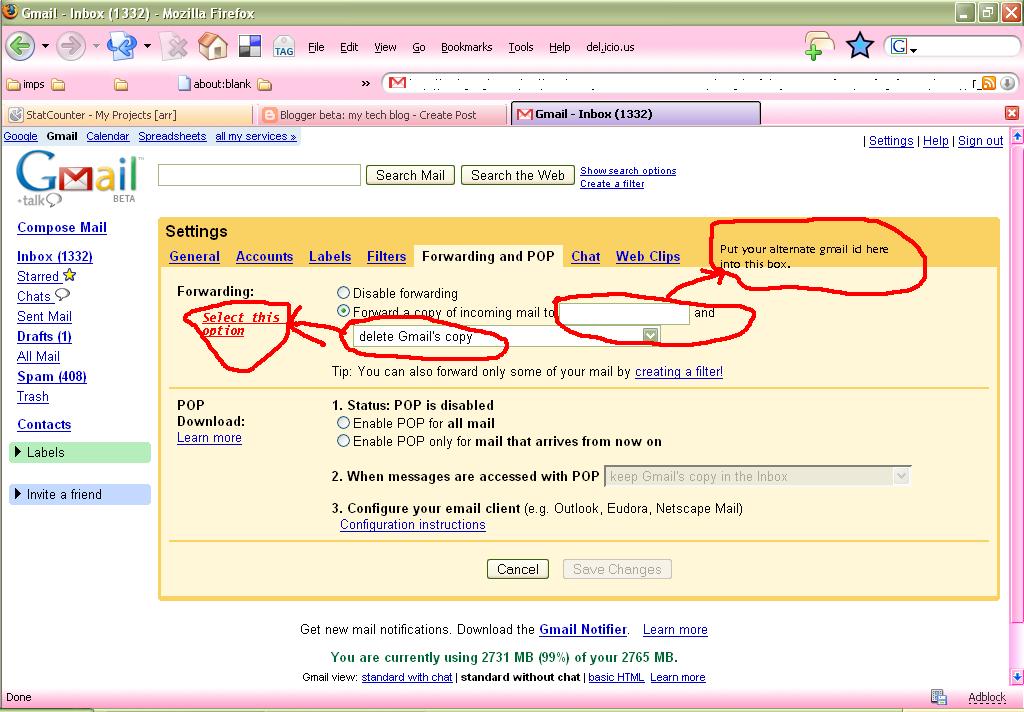
i.e., Forward a copy of incoming mail to [your new gmail id]
and select the option "delete Gmail copy"
* Thats it!! All your incoming emails would be forwarded to your new gmail box now.
your almost full old inbox will remain as it is !!!
[[[ I know that some of you must have already figured this out... But wait... advanced hacks are coming here in my next part !!! ]]]
Feel free to share your thoughts on this...
Subscribe to:
Posts (Atom)