Here is a huge (really huge!!) list of flash games for download.
You can see this :"Index of /games" in its title.
It is basically a listing of folder containing flash files (swf files) from the server.
http://games.lynms.edu.hk/games/
This is one more collection. It is small one but has a good collection.
http://tinyurl.com/yp6mq6
This is not yet blocked in websense under games category.
So you can also use it at office for timepass ;)
(Thanks ryankendall)
Here are some more downloadable games.
Enjoy!!
Showing posts with label save flash games. Show all posts
Showing posts with label save flash games. Show all posts
Friday, August 24, 2007

Wednesday, October 11, 2006
How to save flash games in firefox from any website
UPDATE:
This hack works only in the Firefox browser!! If you don't have the Firefox browser then click on the Firefox button on the right side (-->) of page to download Firefox browser for free!! By the way Firefox is great browser and has so many add on features which is not there in any other browser !! So use the Firefox button there on the right side of page (-->) and download it for free !!!
We often see some nice flash animations and flash games on the web.
You must have wondered how to save flash animation from the web.
You can do it with some special softwares.
You can do it easily without any special softwares also.
Yes... With the Firefox browser.
Steps to save flash in firefox
1) open that page containing that flash in firefox.
2) Now open the menu as shown
Tools >> Page Info >> Media
3) The Media tab shows all the files displayed on this page.
4) Now scroll through all the files and find files with type "Embed" and "application/x-shockwave-flash"
See this picture - this is the "File Info" window in Firefox.
Click on it for see a full view.
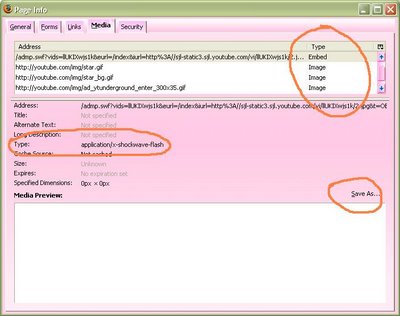
5) Now click on the "Save as" button and save you flash file as you wanted !!!!
This hack works only in the Firefox browser!! If you don't have the Firefox browser then click on the Firefox button on the right side (-->) of page to download Firefox browser for free!! By the way Firefox is great browser and has so many add on features which is not there in any other browser !! So use the Firefox button there on the right side of page (-->) and download it for free !!!
We often see some nice flash animations and flash games on the web.
You must have wondered how to save flash animation from the web.
You can do it with some special softwares.
You can do it easily without any special softwares also.
Yes... With the Firefox browser.
Steps to save flash in firefox
1) open that page containing that flash in firefox.
2) Now open the menu as shown
Tools >> Page Info >> Media
3) The Media tab shows all the files displayed on this page.
4) Now scroll through all the files and find files with type "Embed" and "application/x-shockwave-flash"
See this picture - this is the "File Info" window in Firefox.
Click on it for see a full view.

5) Now click on the "Save as" button and save you flash file as you wanted !!!!
Subscribe to:
Posts (Atom)