Showing posts with label hacks. Show all posts

Monday, July 21, 2008

How to create fake screen shots of any websites


Imagine you could open any webpage, edit any part of page like a word document and then take a screen shot of it!!


Yes. It's possible with firefox and just a bookmarklet !!


Edit Current Website is a bookmarklet that helps you change content of any web page and that too live inside the firefox browser !!


No need to install any extensions like Firebug.
No need to know HTML/Photoshop etc !!


Procedure:
In IE7 you can right click on this link and select "Add to favourites". In Firefox drag it into your bookmark bar. Go to any website which you want to edit and open this bookmarklet. You can edit it as you like. Then take a screen shot or take a printout!!


Link :
Edit current website


Warning :
Please note that any edits are temporary and will disappear when you reload. Also use it at your own risk !!

Wednesday, November 07, 2007

hack to find invisible Yahoo! Messenger friends


Want to surprise your Yahoo! Messenger friends who pretend to be offline using yahoo messenger's invisible feature?

Note: yahoo messenger has a stealth setting setting using which anyone online can appear to be offline using the invisible mode. it is not available in google talk though!:(

Now it is easily possible to beat that stealth mode using tools like Xeeber or VNGrabber. Just go to their site. Put your friends Yahoo id into the box and press "Check" or "Submit" button. It will clearly show whether your friend is really offline or pretending to be offline (i.e. invisible)!!

link1: VNGrabber
link2: Xeeber

Enjoy!

Monday, April 23, 2007

Myspace proxy - A google based private web proxy

Want to browse myspace or say any other blocked sites at school or work ?? Then use the link below to browse that site !! There are many other proxy sites, but they are usually blocked...

A good news is that, there is a private proxy site based on google mobile!!
Many dont know about this one also !! So mostly it is not blocked anywhere at school or work places.

But it cannot open some google based websites like orkut and gmail !! But otherwise it is a very good proxy for other sites

Myspace proxy link

Please note:
If a website is blocked at a place, it may not be legal to open it. So use it at your discretion...


There is a chance that this link might also get blocked one day? If so, please comment me. I can probably find a new link then.

Enjoy !!

UPDATE:

Some more proxies:

http://www.proxysearch.co.uk/
http://www.proksies.com/
http://www.avoidr.com/
http://www.theproxyfree.com/
http://mybarrackobama.com/
http://surfall.net/
http://www.direct-me.info/
http://www.waystounblockmyspace.com/
http://www.dzzt.com/
http://smallprox.com/
http://777.myspace.proxy.googlepages.com/
http://www.viproxy.net/
http://www.httpsurf.com/
http://www.pleaseunblock.com/
http://www.sneak1.info/
http://www.unblockmyspace.us/
http://www.goproxing.com/
http://www.oddproxy.com/
http://www.surfinvis.com/
http://internationalsecretproxy.info/
https://tino.auth-o-mat.com/nph-ex.cgi
https://secure.iblocked.com/cgi-bin/nph-proxy.cgi
https://www.andrewiskickass.org/pyah.plhttps://eng2.computershope.org/educational_resources/nph-proxy.cgi
http://www.houstongreatbooks.org/reading/reading.pl
http://vexiron.com/proxy/nph-proxy.nph
http://www.liveproxy.org/secure/nph-proxy.pl
https://www.traxdata.fr/cgi-bin/nph-p
https://secureforsure.net/cgiproxy/nph-proxy.pl
https://xbmodder.us/cgi-bin/nph-proxy2.cgi
https://secure.iblocked.com/cgi-bin/nph-proxy.cgi
http://advice-now.com/cgiproxy/nph-proxy.pl
http://www.samall.com/asd/nph-proxy.pl
http://op.rainstudios.net/nph-proxy.cgi
http://www.gotdaun.com/cgi-bin/nph-proxy.cgi
http://www.bwem.net/cgi-bin/nph-proxy.cgi
http://k.wensley.x.thita.co.uk/6p6tj3kkla-3r8ihjn-4r1w-kx250h79hyg-1fj52mv69xqrd6y-rfbm602dcd52ilaqbom/pxy.cgi
http://www.theelemethian.com/pass/nph-proxy.pl
http://www.tripleckickers.co.uk/bin/nph-bin.pl

Enjoy!!

Friday, March 16, 2007

Megaupload download slot limit hack - Part 2

When you try to download from megaupload you might be getting the following error:

"All download slots assigned to your country (India) are currently in use. Please try again in a few hours or install the Megaupload Toolbar for immediate access - with the toolbar installed, there are no more slot limitations for you!"

This actually comes because there is a limit to number of users from a particular country who can download from Megaupload.

You can do three things.
  1. Download and install the megaupload toolbar. (but it is not recommended as it is probably a spyware!!)
  2. I have already spoken about another megaupload hack where we change the user agent and download the file
  3. There is a third megaupload hack !!! It is really working great...
  • Go to the google translate tool in this link:http://www.google.com/translate_t
  • Then, in the "Translate a Web Page" box, put the address of your megaupload page.
  • Then select "English to French" and then click translate!!
  • That's it... you can download your file now after about 25 seconds !!!

This megaupload hack comes handy when you want to download a particular file, but face the megaupload download slot limitation...

Enjoy!!

Sunday, March 04, 2007

Useful secret and hidden pages in firefox browser

Here are some of the secret pages hidden inside the Firefox browser?

Type these underlined words into your address bar to see these secret pages of Firefox!!

about:

This shows the Firefox logo, version information and other related stuffs. This can be seen from the "Help --> About" menu item also !!

about:buildconfig

This shows the build related configurations and other related information.

about:license

This shows the license related information, i.e., "Mozilla Public License"

about:cache

This page shows the images and other files stored in you cache memory.

about:plugins

This page shows the plugins installed in your Firefox browser, like flash player, adobe acrobat PDF reader etc…

about:config

This page shows a lot of settings which you can change if you want… But don’t change it if you don’t know what you are doing!!

about:credits

This page shows the credits to the people who created it!!!

about:Mozilla

This is the weirdest of all pages. This page shows a quote from “The Book of Mozilla”
This has raised a question whether is there is anything like religion of Firefox?? Quite weird anyway….

This is what you will get in that about:Mozilla page

“And so at last the beast fell and the unbelievers rejoiced. But all was not lost, for from the ash rose a great bird. The bird gazed down upon the unbelievers and cast fire and thunder upon them. For the beast had been reborn with its strength renewed, and the followers of Mammon cowered in horror.”

From The Book of Mozilla, 7:15

Enjoy browsing with Firefox !!

Tuesday, January 30, 2007

UNIX/LINUX - REVIVE YOUR OLD PC WITH LINUX

Damn Small Linux (DSL) - DSL is a very versatile 50MB mini desktop oriented
Linux distribution. Damn Small is small enough and smart enough to do the
following things: Boot from a business card CD as a live linux distribution
(LiveCD); Boot from a USB pen drive; Boot from within a host operating system
(that's right, it can run *inside* Windows); Run very nicely from an IDE Compact
Flash drive via a method we call "frugal install"; Transform into a Debian OS
with a traditional hard drive install; Run light enough to power a 486DX with
16MB of Ram; Run fully in RAM with as little as 128MB (you will be amazed at how
fast your computer can be!); Modularly grow - DSL is highly extendable without
the need to customize.

Damn Small Linux Website:
http://www.damnsmalllinux.org/

Damn Small Linux Download Website:
http://www.damnsmalllinux.org/download.html

Damn Small Linux FAQ:
http://www.damnsmalllinux.org/wiki/index.php/FAQ

Friday, January 19, 2007

Transform your windows XP into Windows Vista for free !!!


Still waiting to experience windows VISTA???
Well the point is that you can transform your windows XP into windows Vista
by installing a free software called Vista Transformation Pack!!!

Vista Transformation Pack will give to your Windows XP system the new and cool look of Microsoft's future operating system: Windows Vista. The pack changes most of the system icons, skins and toolbars and also adds new enhancements to your desktop such as a dock bar or a different system tray clock !!!

You can download it from SoftPedia with the following link:
Vista Transformation Pack 6 Final

Enjoy !!

Wednesday, October 11, 2006

How to save flash games in firefox from any website

UPDATE:
This hack works only in the Firefox browser!! If you don't have the Firefox browser then click on the Firefox button on the right side (-->) of page to download Firefox browser for free!!
By the way Firefox is great browser and has so many add on features which is not there in any other browser !! So use the Firefox button there on the right side of page (-->) and download it for free !!!


We often see some nice flash animations and flash games on the web.
You must have wondered how to save flash animation from the web.
You can do it with some special softwares.
You can do it easily without any special softwares also.
Yes... With the Firefox browser.

Steps to save flash in firefox

1) open that page containing that flash in firefox.

2) Now open the menu as shown

Tools >> Page Info >> Media

3) The Media tab shows all the files displayed on this page.

4) Now scroll through all the files and find files with type "Embed" and "application/x-shockwave-flash"

See this picture - this is the "File Info" window in Firefox.

Click on it for see a full view.


5) Now click on the "Save as" button and save you flash file as you wanted !!!!

Sunday, September 24, 2006

Megaupload download slot bypass hack

UPDATE:
This hack works only in the Firefox browser!! If you don't have the Firefox browser then click on the Firefox button on the right side (-->) of page to download Firefox browser for free!!
By the way Firefox is great browser and has so many add on features which is not there in any other browser !! So use the Firefox button there on the right side of page (-->) and download it for free !!!


NOTE: The following hack doesn't seem to work in some countries.
So, a new megaupload hack is given here. So use that if this don't work.

Megaupload
is a popular file hosting service. It allows files upto 250MB to be uploaded by anyone and then downloaded for free by anyone.

But it has some limitations... Yes, the number of download slots is limited for some countries.
If all the slots for a country are occupied then no one from that country can download any file.
The following error message is displayed:

"All download slots assigned to your country are in use. Please try again later."

You will have to wait till any of the slots become free to start downloading.

Hacks to bypass megaupload download slot limitations:

  • Install "User Agent Switcher" extension in your firefox browser using the following location.
http://chrispederick.com/work/useragentswitcher/
  • Then add a new user agent as given below.
Mozilla/4.0 (compatible; MSIE 6.0; Windows NT 5.1; SV1; Alexa Toolbar)

  • Now change your user agent to the above mentioned one.
  • Now open the megaupload link and download without any trouble.

NOTE: The above hack doesn't seem to work in some countries. new megaupload hack is here. So use this, if the above don't work.

Sunday, September 17, 2006

What to do if my gmail gets full ?

Update: Your Gmail is not yet full? I have a post which will help you to avoid getting gmail full.

Gmail gives a lot of storage space...but sometimes, even that 2+ GB is not sufficent for us !!!If you can follow my instructions then you can get all your email, even if its full !!

* Delete at least few emails with unnecessary big attachment. Even if you dont want to delete it then forward to any of your alternate mail boxes. Make sure that its 99% full but not 100%. It wont be a problem for you to receive any mail, here after.
(Usually you can delete the MP3 files stored in your Gmail !! Obviously you must be having those somewhere else in your ipod or your hard disk!! )

* Signup for another Gmail account. (Note: This is where all of your emails are going to come here after after some tweaks)

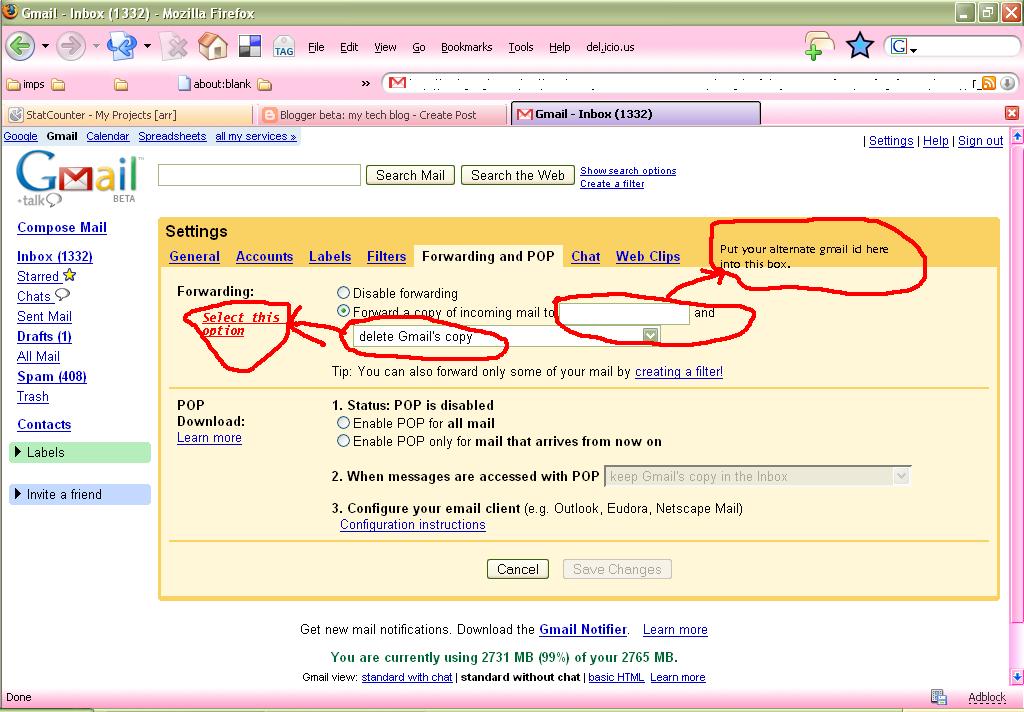
* Now, go to your inbox where its almost full. Then go to settings. There click on the tab link "Forwarding and POP"

* Fill it as shown below.


i.e., Forward a copy of incoming mail to [your new gmail id]
and select the option "delete Gmail copy"

* Thats it!! All your incoming emails would be forwarded to your new gmail box now.
your almost full old inbox will remain as it is !!!

[[[ I know that some of you must have already figured this out... But wait... advanced hacks are coming here in my next part !!! ]]]

Feel free to share your thoughts on this...

Tuesday, September 12, 2006

Welcome to my blog

Welcome to my blog. Here you can find many useful stuff.
This is going to be pure Tech blog.

I have planned to speak about various things like
* My broadband BSNL Dataone connection
* Useful Internet tips and tricks
* Coding Contests for developers
* and so on....

I am going to tell my new findings on internet also !!

So keep visiting my blog.
Dont forget to bookmark my blog !!!