Must read news about the Gphone from the Official Google Blog:
Find the article in the link below.
Where's my Gphone?
Showing posts with label google. Show all posts
Showing posts with label google. Show all posts
Tuesday, November 06, 2007

Monday, May 07, 2007
Stop google from saving your search queries !!
Do you want to stop google from saving your search queries and search google in a more secure manner ??
Here is a small wonder called scandoo, which allows you to search google in exactly same manner as the original google. But it also scans the individual pages in the search results and warns you if any of them contains malicious items in it!! That is its wonder !!
You have other benefits with this also:
You can hide yourself from google and stop google from saving your ip and search keywords.
You can stop opening offensive content (kinda NSFW) at office. This displays a X sign near the result, if the site contains any offensive material. Also, this sites gives you an option to select various categories which should be considered offensive.
You also have yahoo search and msn search here. (But, every search is not integerated with the other one)
Enjoy!!
Friday, March 23, 2007
Google introduces cool themes in 'Personalized Home' page
Google's 'Personalized Home' earlier used to look very dull and plain..
but now it has added themes to it and it looks really very cool...
List of themes now offered are
Beach
Bus Stop
City Scape
Sweet Dreams
Tea House
Seasonal Scape
See a screen shot below !!
[ Click on the image to view it in full size ]

Isn't it really cool ? Enjoy !!
but now it has added themes to it and it looks really very cool...
List of themes now offered are
Beach
Bus Stop
City Scape
Sweet Dreams
Tea House
Seasonal Scape
See a screen shot below !!
[ Click on the image to view it in full size ]

Isn't it really cool ? Enjoy !!
Monday, January 29, 2007
Free Word to PDF conversion with google docs
Free Word to PDF conversion with google docs
Yes... You can convert your MS Word files into an PDF file using a new service by Google.
Link to that site is this : Google Docs
Login to the Google Docs using your gmail username and password.

Then you can see a link called Upload
below this image.
Click on "Upload" link to go to the "Upload a file" page.
Now choose your MS word file using browse button.
Specify a different name if needed.
Then Click on Upload File button.
Now its saved on files section.
Now in to your Files section select it using the Check box.
Now choose the menu as shown.
Actions >> Save as PDF
Thats it. It will prompt the download of your converted PDF file.
Also your file is saved there in the Google server.
Delete it if your concerned about its privacy......
Enjoy !!!!
Yes... You can convert your MS Word files into an PDF file using a new service by Google.
Link to that site is this : Google Docs
Login to the Google Docs using your gmail username and password.
Then you can see a link called Upload
below this image.
Click on "Upload" link to go to the "Upload a file" page.
Now choose your MS word file using browse button.
Specify a different name if needed.
Then Click on Upload File button.
Now its saved on files section.
Now in to your Files section select it using the Check box.
Now choose the menu as shown.
Actions >> Save as PDF
Thats it. It will prompt the download of your converted PDF file.
Also your file is saved there in the Google server.
Delete it if your concerned about its privacy......
Enjoy !!!!
Friday, January 19, 2007
Funny bug in google talk
Funny things are happening because of a bug in Google talk.
( ref. to Google talk version : 1.0.0.104 )
To see that funny thing do this:
Logout of google talk.
Close the Google talk by clicking the X (close) button on the top right corner.
Now it should run in the background.
Now right click on the Google talk icon in the right bottom of the desktop.
It will show a menu which is perfectly fine !!!
Now turn the 'CAP LOCK' on.
Press the escape key.
Now do the same thing again (right click on the google talk icon in the right bottom of the desktop)
You will see a funny message popping up on the desktop from nowhere!!!
Hope the guys at Google take a note of this !!!!

( ref. to Google talk version : 1.0.0.104 )
To see that funny thing do this:
Logout of google talk.
Close the Google talk by clicking the X (close) button on the top right corner.
Now it should run in the background.
Now right click on the Google talk icon in the right bottom of the desktop.
It will show a menu which is perfectly fine !!!
Now turn the 'CAP LOCK' on.
Press the escape key.
Now do the same thing again (right click on the google talk icon in the right bottom of the desktop)
You will see a funny message popping up on the desktop from nowhere!!!
Hope the guys at Google take a note of this !!!!

Wednesday, September 20, 2006
Great Google Adsense Alternatives
Are you not able to signup to google Adsense for some reasons ????
Did google kick you out of Adsense program ???
Then this list is for you. Here is a list of programs from where you can earn money.
It is a great alternative for google adsense.
Adbrite
AdEngage
Adgenta
Adhearus
AffiliateSensor
AllFeeds
BannerBoxes
BidClix
Bidvertiser
CBProSense
Chitika
ClicksAdsDirect
Clicksor
ContextWeb
Enhance Interactive
ExpoActive
Fastclick
InfoGrabber
Intellitxt
Kanoodle
Nixxie
Quigo
RevenuePilot
SearchFeed
TargetPoint
Veoda
My Pick is Bidvertiser !! It has an very easy registration process. We can start earning instantaneously !!!
Did google kick you out of Adsense program ???
Then this list is for you. Here is a list of programs from where you can earn money.
It is a great alternative for google adsense.
My Pick is Bidvertiser !! It has an very easy registration process. We can start earning instantaneously !!!
Sunday, September 17, 2006
What to do if my gmail gets full ?
Update: Your Gmail is not yet full? I have a post which will help you to avoid getting gmail full.
Gmail gives a lot of storage space...but sometimes, even that 2+ GB is not sufficent for us !!!If you can follow my instructions then you can get all your email, even if its full !!
* Delete at least few emails with unnecessary big attachment. Even if you dont want to delete it then forward to any of your alternate mail boxes. Make sure that its 99% full but not 100%. It wont be a problem for you to receive any mail, here after.
(Usually you can delete the MP3 files stored in your Gmail !! Obviously you must be having those somewhere else in your ipod or your hard disk!! )
* Signup for another Gmail account. (Note: This is where all of your emails are going to come here after after some tweaks)
* Now, go to your inbox where its almost full. Then go to settings. There click on the tab link "Forwarding and POP"
* Fill it as shown below.
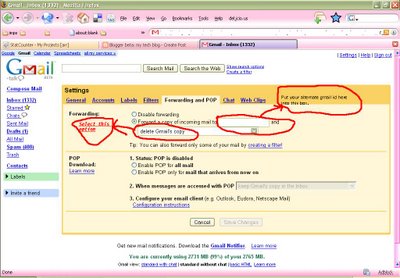
i.e., Forward a copy of incoming mail to [your new gmail id]
and select the option "delete Gmail copy"
* Thats it!! All your incoming emails would be forwarded to your new gmail box now.
your almost full old inbox will remain as it is !!!
[[[ I know that some of you must have already figured this out... But wait... advanced hacks are coming here in my next part !!! ]]]
Feel free to share your thoughts on this...
Gmail gives a lot of storage space...but sometimes, even that 2+ GB is not sufficent for us !!!If you can follow my instructions then you can get all your email, even if its full !!
* Delete at least few emails with unnecessary big attachment. Even if you dont want to delete it then forward to any of your alternate mail boxes. Make sure that its 99% full but not 100%. It wont be a problem for you to receive any mail, here after.
(Usually you can delete the MP3 files stored in your Gmail !! Obviously you must be having those somewhere else in your ipod or your hard disk!! )
* Signup for another Gmail account. (Note: This is where all of your emails are going to come here after after some tweaks)
* Now, go to your inbox where its almost full. Then go to settings. There click on the tab link "Forwarding and POP"
* Fill it as shown below.
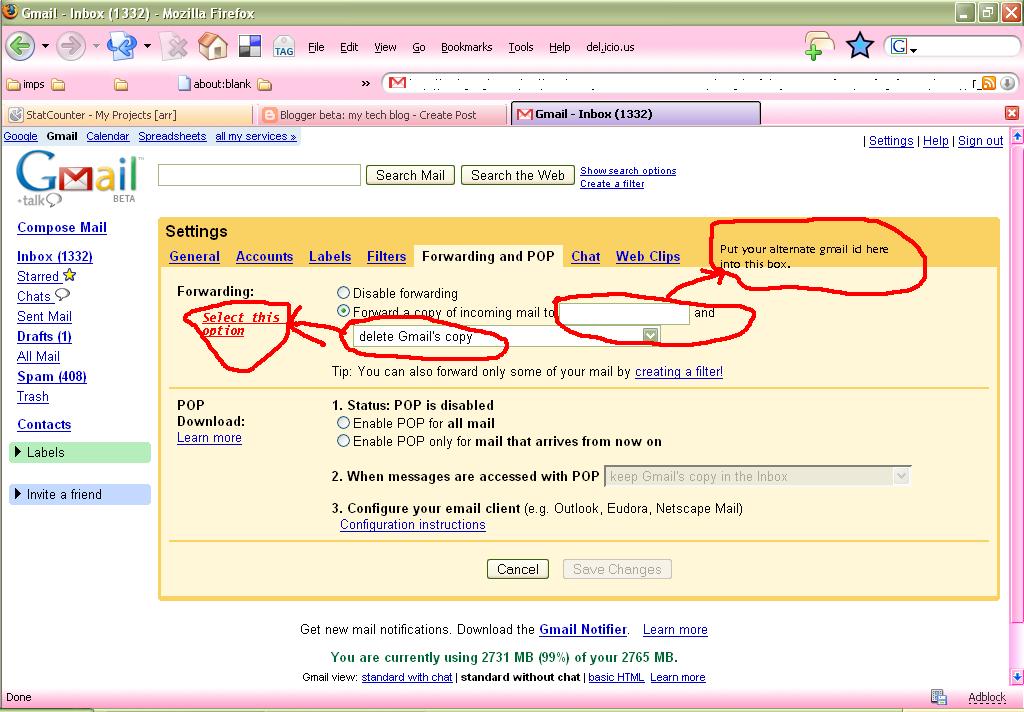
i.e., Forward a copy of incoming mail to [your new gmail id]
and select the option "delete Gmail copy"
* Thats it!! All your incoming emails would be forwarded to your new gmail box now.
your almost full old inbox will remain as it is !!!
[[[ I know that some of you must have already figured this out... But wait... advanced hacks are coming here in my next part !!! ]]]
Feel free to share your thoughts on this...
Subscribe to:
Posts (Atom)